Forums Technical subjects Patchwork 3D – User Support What’s the use for a “Product” when there’s already “Aspects”?

Author Posts

graphics
Participant

Despite 400 pages of manual, I don’t think it’s clear what the difference between a product and an aspect is.

I tried duplicating a product and deleting objects from it, but not only did those objects disappear from the first product, the visibility settings seemed to also be linked between products.

Also, that manual doesn’t mention if different triangulation detail levels can be saved in products or aspects. Can they?


graphics
Participant

A good example here is that I have a very complicated product with hundreds of internal objects. Objects I can’t see unless I hide the covering surfaces, which are a dozen or so. What workflow in Patchwork 3D do I use to create a product/configuration which doesn’t include the internal objects, without first writing down on paper what the covering surfaces are named and then searching for each of them to unhide as a final very tedious step?

When I search the 400 page manual for “instance” or “instanced object” it appears as if Patchwork 3D has no concept of that or that it is named something entirely different.


Julien
Participant

Hi, I would recommend to use aspect layers instead of products. With aspect layers, you can have configuration. If you want to make some part appear and disappear, you should use geometry layer configuration. The parts visibility is managed with geometry layers (shaper).

No, we don’t have LOD. You can manage different triangulation level by duplicating surfaces, re-tesselate the duplicated surfaces and manage visibility with configuration.


Julien
Participant

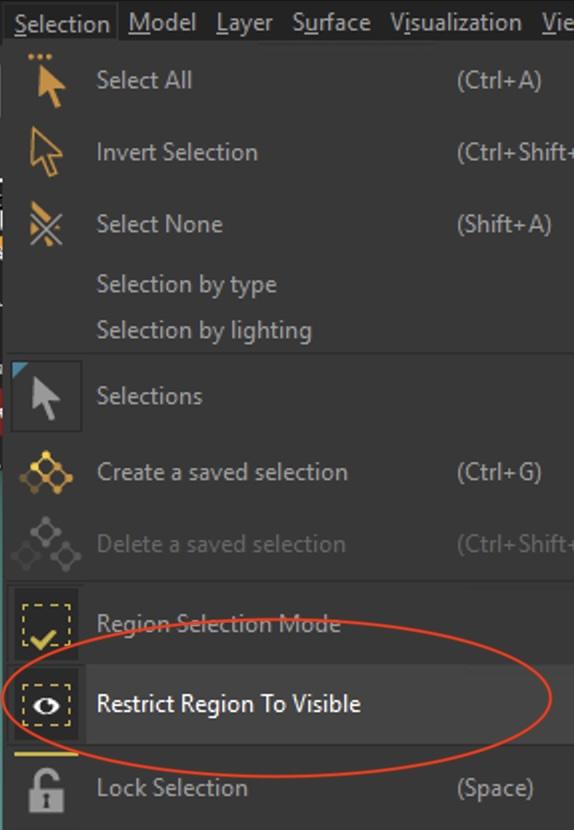
You can select the visible parts in the “restrict region to visible” mode (the default selection mode selects all surfaces that are behind the cursor, even the hidden ones). Then click “Visualization/Hide selected” in order to hide the visible objects and see the internal objects. You can then select them all and manage them the way you want (hide them, delete them, move them to another geometry layer)


Julien
Participant

About configuration, you can have a look at https://www.youtube.com/watch?v=xIzKTRQTXtM (in French, but you can have english subtitles)


  • You must be logged in to reply to this topic.